LangChain.js: A Practical Guide
A practical introduction to LangChain.js, exploring core concepts and building AI-powered applications with JavaScript and Node.js.
October 17, 2026
Get a quick audio overview of this article.
At a broader level, LangChain.js is a framework that helps developers build AI-powered applications.
Using LangChain.js, we can easily build and integrate AI features into existing systems by connecting to LLM providers such as OpenAI and Google Gemini. It also provides various utilities that simplify the development process.
In simple terms, LangChain.js helps us build AI systems by providing useful abstractions and utilities that hide much of the underlying complexity.
LangChain.js provides several components and utilities that help us build AI-powered systems, such as:
- Prompts: Structure and guide the input given to an LLM.
- Chains: Connect multiple operations to create a workflow.
- Agents: Enable LLMs to decide which tools or actions to use to accomplish a task.
These are just a few of the core concepts we'll explore throughout this guide.
A common question that comes to mind is: Why not use an LLM provider's API directly, such as the OpenAI API or Google Gemini API, instead of using LangChain.js?
Let's understand this with a practical example.
1. Switching Between LLM Providers
Suppose we're building a blog generation application using the Gemini API. We send a prompt such as "Write a blog about JavaScript vs Python" and receive the generated response.
This works perfectly fine. However, imagine that in the future, we want to switch from Gemini to OpenAI.
In that case, we may need to modify our code to accommodate the new provider's API, request format, and response handling.
LangChain.js provides a common interface for working with different model providers, making it easier to switch between them with minimal changes to our application code.
2. Building AI Applications Requires More Than Calling an API
Calling an LLM API and receiving a response is just the beginning. Real-world AI applications often require additional functionality, such as:
- Prompt Templates: Dynamically structure prompts using variables and reusable templates.
- Output Parsing: Process and transform the model's response into a usable format.
- Structured Outputs: Get responses in a predefined structure, such as JSON.
- Memory and Context Management: Maintain relevant conversation history and context.
- Web Search Integration: Retrieve information from the web before generating a response.
- Multi-Step Workflows: Break complex tasks into smaller steps and execute them in sequence.
For example, imagine building an AI-powered blog generation system that performs the following tasks:
- Researches the topic using web search.
- Generates a suitable blog title and outline.
- Writes each section of the blog.
- Combines the sections into a complete article.
- Formats the final output into a predefined structure.
Implementing this entire workflow using raw API calls would require us to write and maintain additional logic for each step.
3. How Does LangChain.js Help?
This is where LangChain.js comes in.
It provides reusable components, integrations, and abstractions that simplify the development of AI-powered applications. Instead of implementing every piece of functionality from scratch, we can use these building blocks to create more complex AI workflows.
Some of the important components and capabilities include:
- Chat Models: Interact with LLM providers.
- Prompts: Create reusable and dynamic prompt templates.
- Output Parsers: Transform model responses into usable data.
- Structured Outputs: Define the expected structure of model responses.
- Chains and Runnables: Connect operations to build multi-step workflows.
- Tools and Agents: Enable models to interact with external tools and decide which actions to take.
We'll explore these components in detail throughout this guide.
Conclusion
Using an LLM API directly is perfectly fine for simple use cases. However, as our application grows and requires more integrations, structured outputs, or multi-step workflows, managing everything ourselves can become complicated.
LangChain.js helps simplify this complexity by providing reusable components and a consistent way to build AI-powered applications.
Setting up LangChain.js in a Node.js application is straightforward. We just need to follow the official documentation and install the required packages.
Step 1: Set Up Your Environment
First, make sure you have Node.js and npm installed on your system.
You can verify the installation by running the following commands in your terminal:
node -v
npm -v
Step 2: Install LangChain.js
Open your terminal inside your project directory and run the following command:
npm install langchain @langchain/core
This installs the main LangChain.js package and its core abstractions, which are used to build AI-powered applications.
Step 3: Install the Required Integrations
Depending on your application's requirements, you may need additional packages to work with specific LLM providers or other utilities.
For example, to integrate OpenAI models into your application, install the OpenAI integration package:
npm install @langchain/openai
Similarly, you can install the relevant integration package for other providers, such as Google Gemini.
Note: You don't need to install every integration. Install only the packages required by your application.
For the latest installation instructions and supported integrations, refer to the official LangChain.js documentation.
That's it! You're now ready to start building AI-powered applications using LangChain.js.
Now, let's make our first call to an LLM (Large Language Model).
To get started without spending money, we'll use Groq, which provides access to various open-weight models through its API. Unlike running these large models locally, we can send requests to models hosted on Groq's servers.
We'll use Groq for this tutorial.
Step 1: Create a Groq API Key
First, create an account on the Groq platform and generate an API key.
You can create your API key here: Groq API Keys
We'll use this API key to authenticate requests from our application.
Step 2: Install the ChatGroq Integration
LangChain.js provides a dedicated integration package for working with Groq models.
Install it by running the following command in your terminal:
npm install @langchain/groq
This installs the ChatGroq integration, which allows us to interact with models hosted on Groq through LangChain.js.
Step 3: Initialize the Chat Model
After creating your API key and installing the package, we're ready to initialize our first chat model.
import { ChatGroq } from "@langchain/groq";

const llm = new ChatGroq({
  model: "openai/gpt-oss-120b",
});
In this example, we're using the openai/gpt-oss-120b model, an open-weight model hosted by Groq.
Here, we're initializing our chat model by specifying which model we want to use.
Note: Make sure your Groq API key is configured securely using an environment variable, such as GROQ_API_KEY. Never hardcode your API key directly into your source code.
Step 4: Make Your First LLM Call
Now that we've initialized our model, let's send our first message to it.
const aiMsg = await llm.invoke("Hello Bhaiya Kaisan Baa?");
The invoke() method sends the input message to the model and returns its response.
We can access the generated text using:
console.log(aiMsg.content);
That's it! We've successfully learned the basic process of calling an LLM using LangChain.js.
Conclusion
As you can see, making an LLM call using LangChain.js is straightforward. We initialize a chat model, provide an input using invoke(), and receive the model's response.
In the next sections, we'll explore how LangChain.js helps us do much more than simply send messages to an LLM.
1. What Are Prompts?
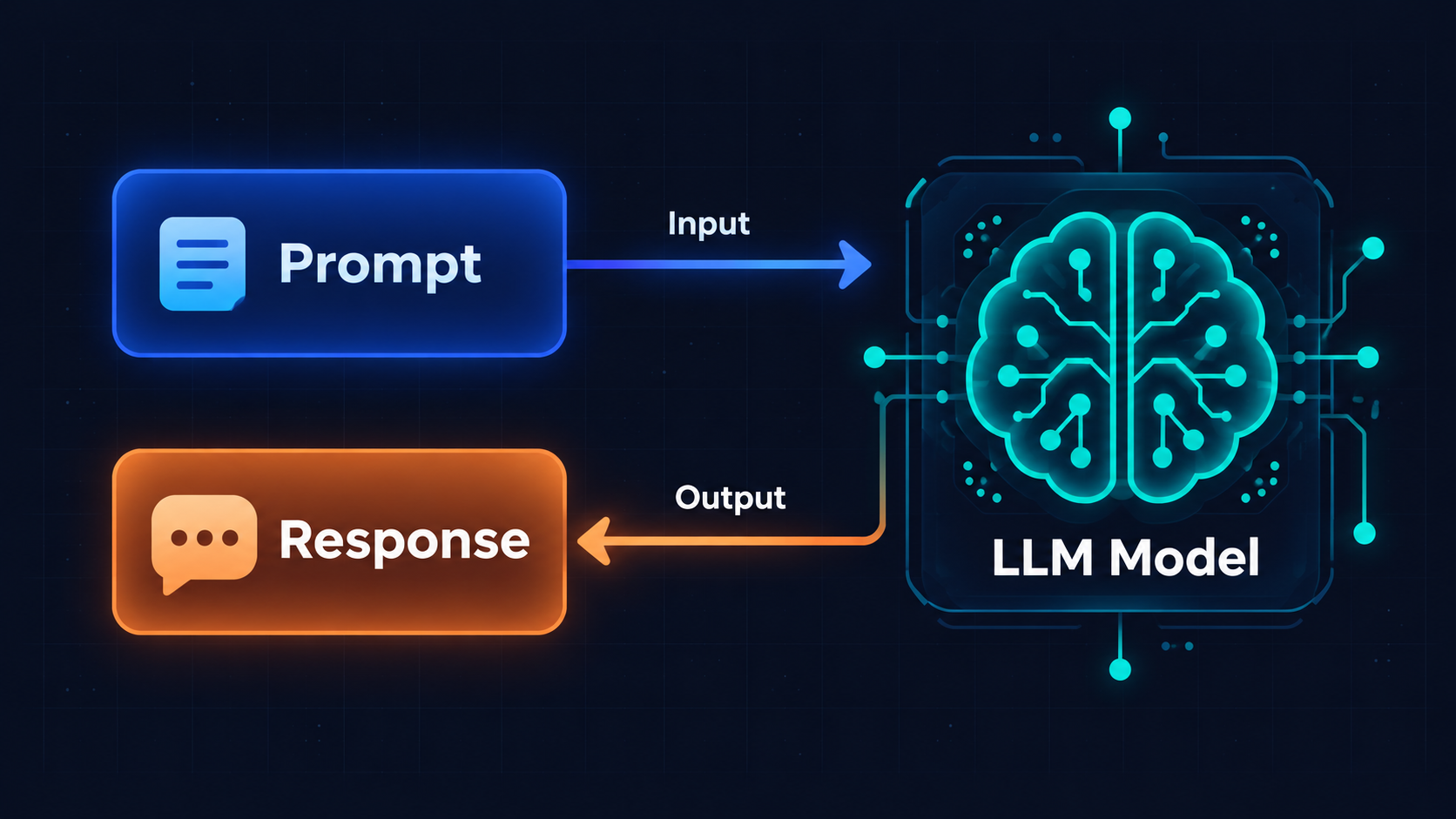
In simple terms, a prompt is a question, instruction, or query that we provide to an LLM (Large Language Model), based on which the model generates an output.
Prompts can be of two types:
- Static Prompts: Prompts that remain the same every time.
- Dynamic Prompts: Prompts that can change based on the input provided at runtime.
2. Static Prompts
For static prompts, we can simply store the prompt in a variable and pass it to the model when invoking it.
Code Example:
const BLOG_PROMPT = "Write a blog on Python vs. JavaScript.";

const model = new ChatGroq({
  model: "gpt-oss-120b",
});

const resp = await model.invoke(BLOG_PROMPT);

console.log(resp.content);
In the above example, we need a static prompt, so we store it in a variable named BLOG_PROMPT and pass it to the model.
3. Dynamic Prompts
With dynamic prompts, we do not want to use the same prompt every time. Instead, we want to create a reusable prompt whose content can change depending on the input.
In LangChain.js, we have two options for creating dynamic prompts:
- Use JavaScript template literals.
- Use the
PromptTemplatecomponent provided by LangChain.js.
Option 1: Using JavaScript Template Literals
We can use JavaScript template literals to insert dynamic values into a prompt.
Code Example:
const option1 = "Go";
const option2 = "Java";

const DYNAMIC_PROMPT = `
Give the difference between ${option1} and ${option2}.
`;

const resp = await model.invoke(DYNAMIC_PROMPT);

console.log(resp.content);
The issue with this approach is that we need to define the values before constructing the prompt. The values are inserted when the template literal is evaluated, rather than being supplied through a reusable template when invoking the model.
To overcome this limitation and make our prompts more reusable, we can use the PromptTemplate component provided by LangChain.js.
Option 2: Using PromptTemplate
Code Example:
import { PromptTemplate } from "@langchain/core/prompts";

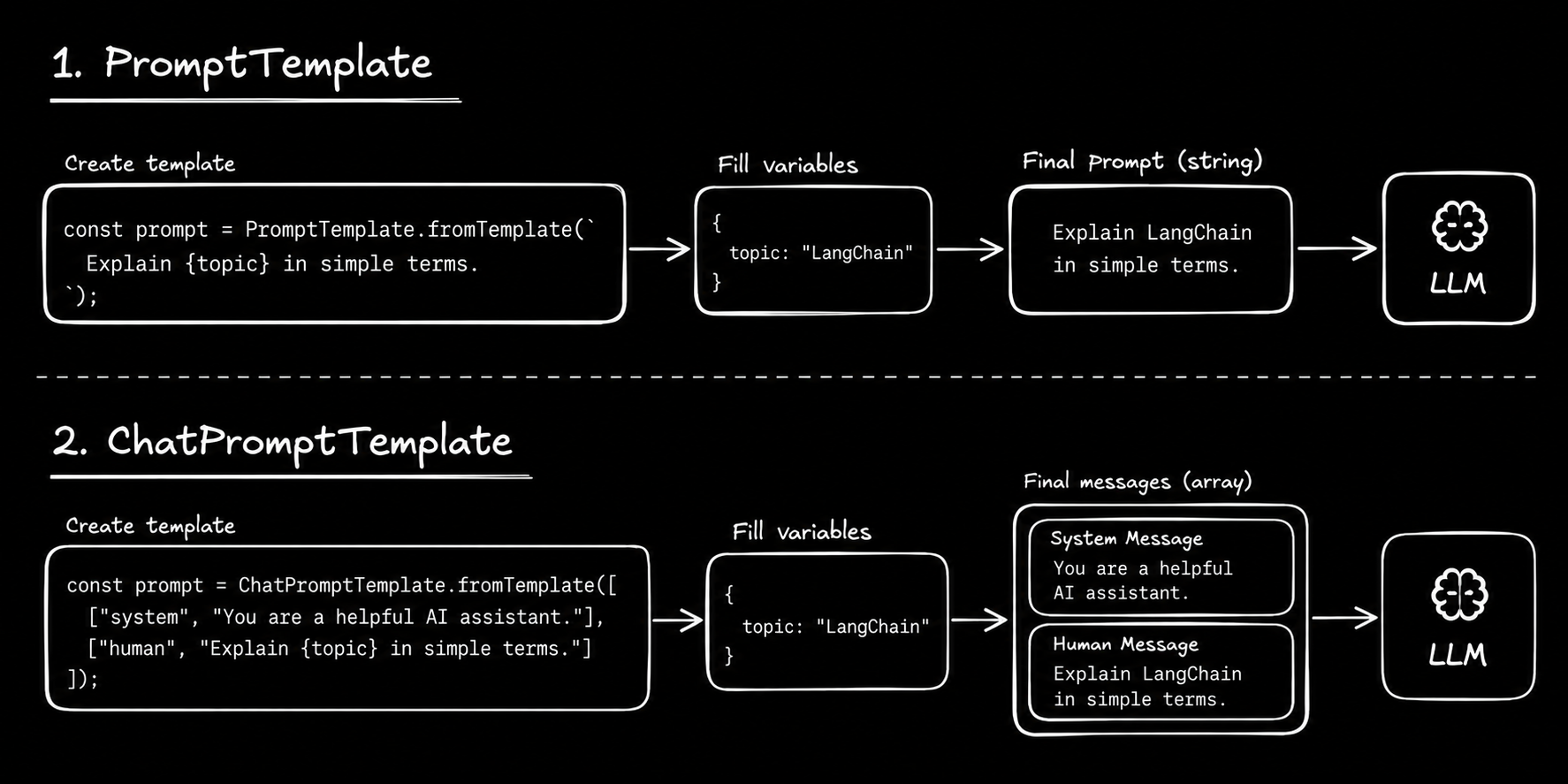
const template = PromptTemplate.fromTemplate(
  "Give the difference between {option1} and {option2}."
);

const PROMPT = await template.format({
  option1: "Go",
  option2: "Java",
});

const resp = await model.invoke(PROMPT);

console.log(resp.content);
In the above example, we use the PromptTemplate component provided by LangChain.js to create a reusable prompt.
The template contains placeholders such as {option1} and {option2}. We provide their values using the format() method, which generates the final prompt at runtime.
This approach makes it easy to reuse the same template with different values. For example:
option1: "Rust"andoption2: "PHP"option1: "Python"andoption2: "JavaScript"
We can change the input values without modifying the original template.
For now, we need to perform two steps:
- Format the template using
format(). - Pass the resulting prompt to the model using
invoke().
Later, when we learn about Chains in LangChain.js, we will see how these steps can be combined into a single workflow.
4. Chat Prompt Templates
LangChain.js provides another useful option called ChatPromptTemplate.
ChatPromptTemplate helps us organize prompts as an array or list of messages. Each message has a role that indicates who is speaking or what purpose the message serves.
Common message roles include:
- System
- Human
- AI
- Tool
For now, let us focus on the System, Human, and AI message types.
Types of Messages
1. System Message
A system message defines how the model should behave and respond. It is generally used to provide instructions, context, and guidelines for the model.
2. Human Message
A human message represents the actual question, query, or instruction provided by the user while interacting with the application.
3. AI Message
An AI message represents a response generated by the chat model or LLM. It can also be included in a prompt to provide previous conversation context.
Using ChatPromptTemplate
Using ChatPromptTemplate, we can organize these messages into a structured format and pass them to the model.
This is particularly useful when we need to provide the model with the context of an entire conversation, such as in a chatbot application.
Code Example:
import { ChatPromptTemplate } from "@langchain/core/prompts";

const prompt = ChatPromptTemplate.fromMessages([
  ["system", "You are a helpful assistant that answers concisely."],
  ["human", "Translate the following sentence to French: {sentence}"],
]);

const formattedPrompt = await prompt.formatMessages({
  sentence: "Hello, how are you?",
});

const response = await model.invoke(formattedPrompt);

console.log(response.content);
In the above example:
- We create a chat prompt template using
ChatPromptTemplate.fromMessages(). - We define a system message that instructs the model to answer concisely.
- We define a human message containing a placeholder named
{sentence}. - We use
formatMessages()to replace the placeholder with the actual sentence. - We pass the formatted messages to the model using
invoke().
As with PromptTemplate, we currently perform two separate steps: formatting the prompt and invoking the model.
Later, when we learn about Chains in LangChain.js, we will see how these steps can be combined into a single workflow.
5. Summary
For now, this much knowledge about prompts should be sufficient. As we progress further, we will explore additional prompt-related features whenever they become necessary.
Below is a diagram illustrating what we have learned in the Prompts section.
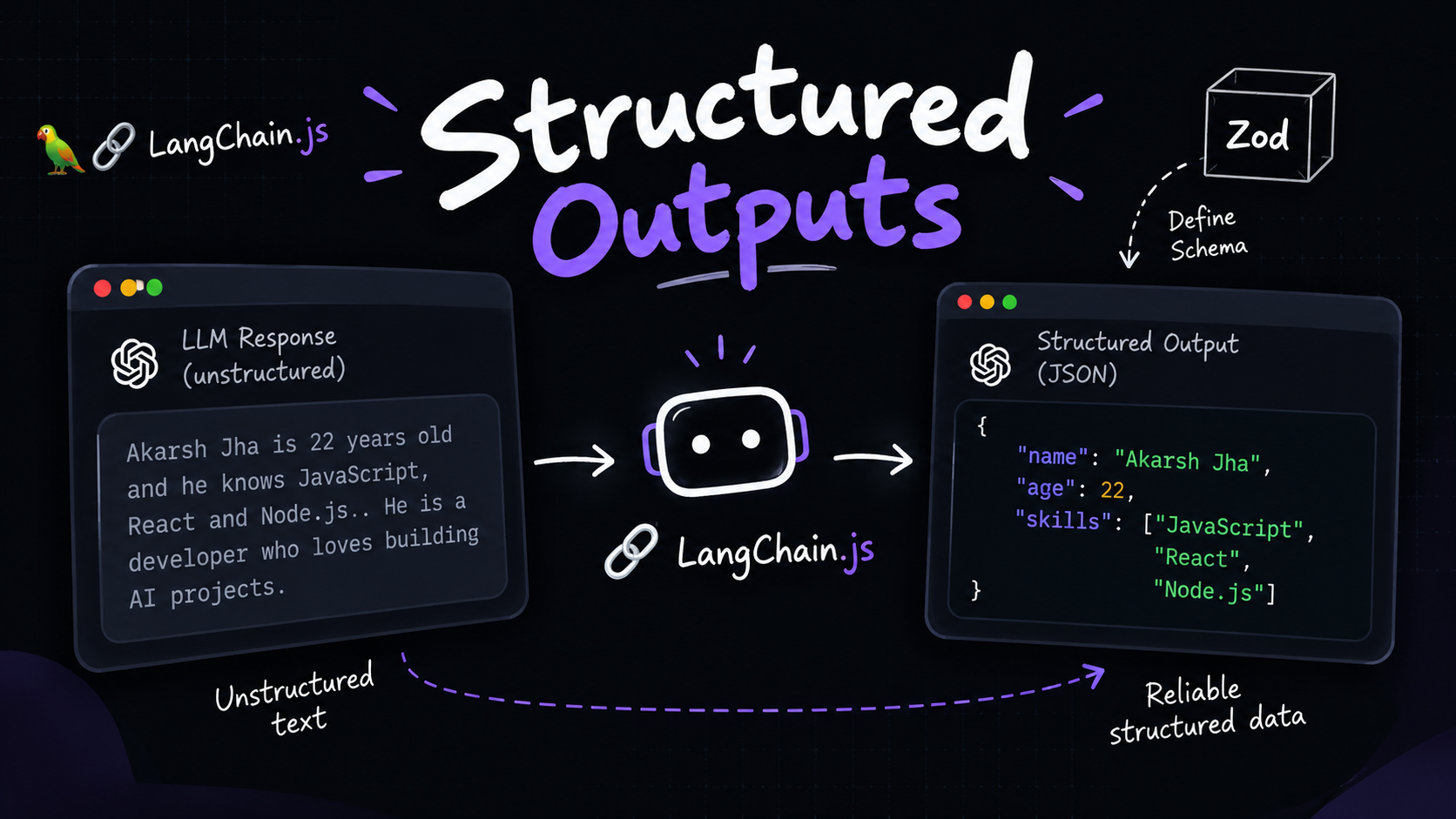
1. Why Do We Need Structured Output?
LLMs are non-deterministic in nature, meaning they can produce different outputs even when given the same input.
In real-world applications, however, we often need outputs to follow a strict and predictable structure so that our application logic does not break.
For example, suppose we want the model to return the following information:
{
  "name": "string",
  "city": "string",
  "phone": "number"
}
One approach would be to instruct the model to follow this structure in its response. However, this is not always reliable. Sometimes, the model may include additional text, explanations, or formatting instead of returning the expected structure directly.
To overcome this problem, LangChain.js provides a way to obtain structured output from a model.
2. Using Zod to Define a Schema
To generate structured output, we can define a schema that specifies the expected structure and data types of the model's response.
For this, we can use Zod, a TypeScript-first schema validation library widely used in the JavaScript ecosystem.
First, install Zod in your project:
Installation:
npm install zod
3. Implementing Structured Output
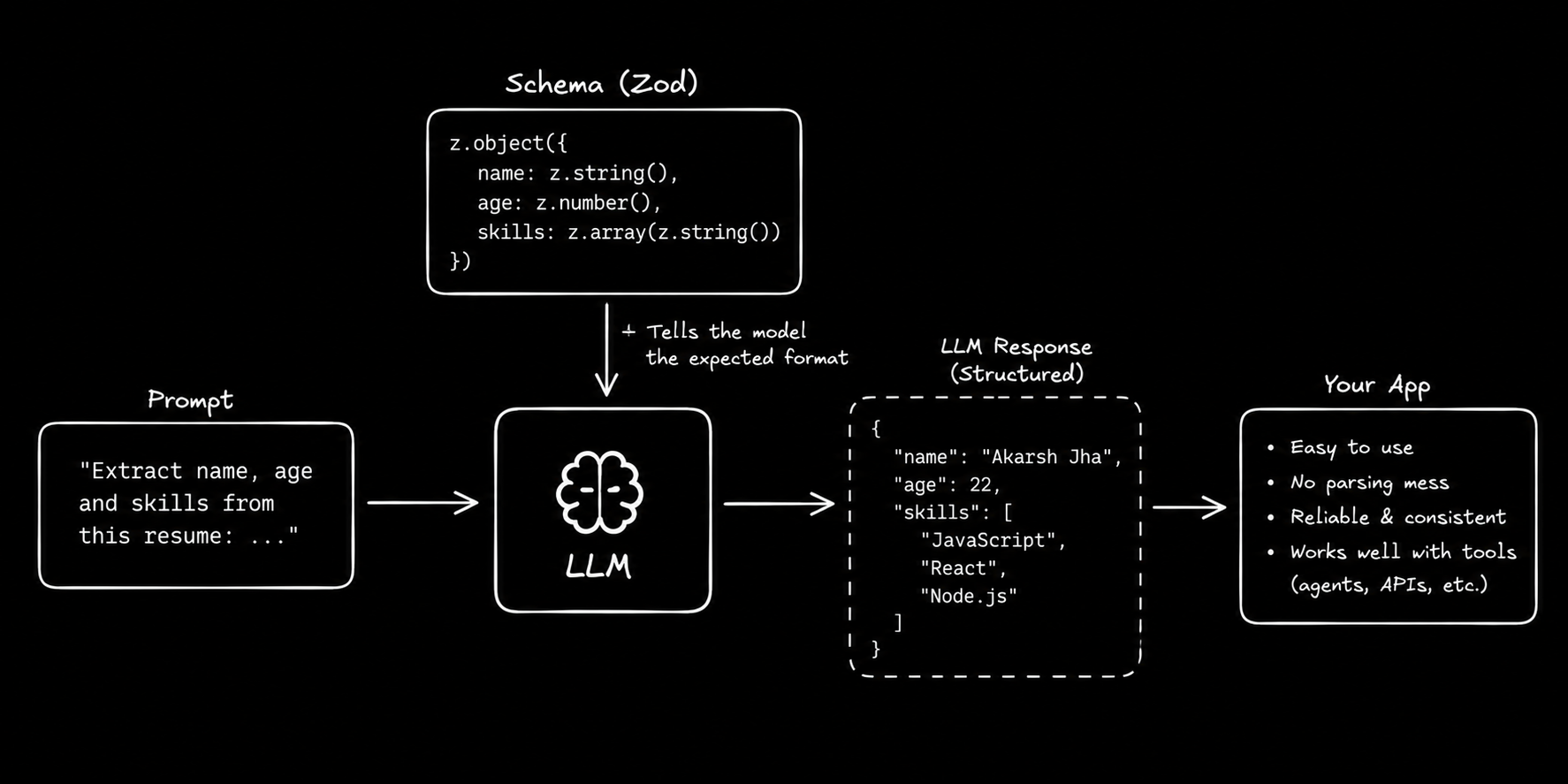
Once Zod is installed, we can define a schema and pass it to the model using LangChain.js's withStructuredOutput() method.
Code Example:
import * as z from "zod";

const OutputSchema = z.object({
  name: z.string(),
  age: z.number(),
  skills: z.array(z.string()),
});

const structuredModel = model.withStructuredOutput(OutputSchema);

const resp = await structuredModel.invoke(
  "He is Akarsh Jha, 22 years old, and he knows the MERN stack."
);

console.log(resp);
4. Understanding the Code
In the above example:
- Define the schema: We use
z.object()to define the expected structure of the output. - Specify the data types: We use
z.string()for strings,z.number()for numbers, andz.array(z.string())for an array of strings. - Configure the model: We use
withStructuredOutput(OutputSchema)to create a model configured to return output matching the specified schema. - Invoke the model: We pass the prompt to the structured model using
invoke(). - Receive the output: The model returns the extracted information in a structured format that can be used by our application.
For the given input, the output would look something like this:
{
  "name": "Akarsh Jha",
  "age": 22,
  "skills": ["MERN Stack"]
}
Note: The output above is illustrative. The actual values depend on the model's interpretation of the input.
5. Summary
The withStructuredOutput() method helps us obtain model responses in a predefined structure rather than relying on free-form text.
By combining Zod schemas with LangChain.js, we can specify the expected fields and their data types, making model outputs easier to integrate into application logic.
However, structured output does not guarantee that every response will be correct or that every value will be factually accurate. For production applications, we should still handle errors and validate the returned data where necessary.
Below is a diagram illustrating the structured output process.
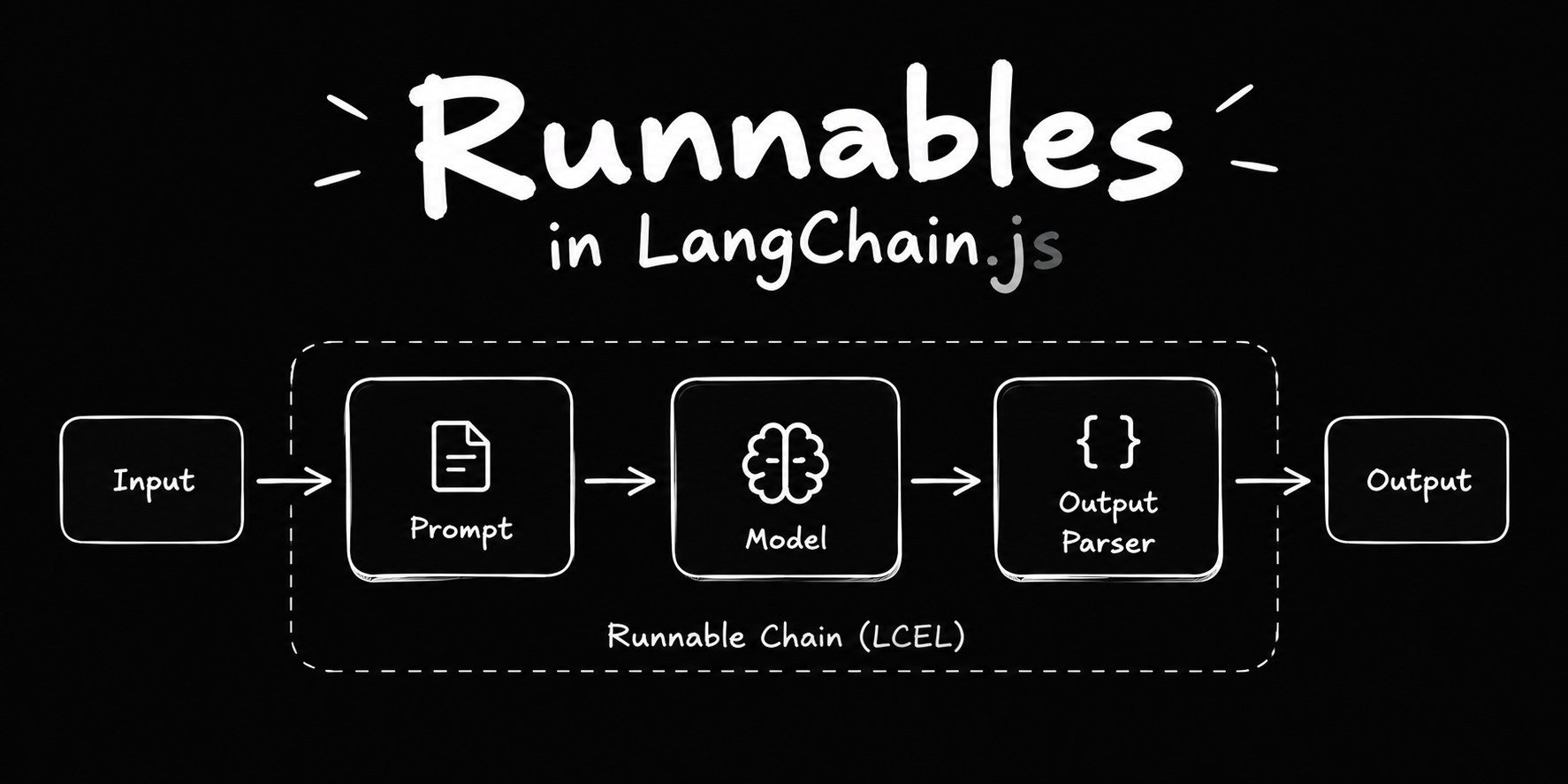
What Are Runnables?
In LangChain.js, a Runnable is a basic unit of work that takes an input, processes it, and produces an output.
Runnables provide a common interface for different LangChain components, such as Prompt Templates, Chat Models, and Output Parsers. This allows these components to work consistently and be connected to build complex AI workflows.
Some commonly used Runnable methods are:
invoke()— Executes a Runnable with a single input.batch()— Executes a Runnable with multiple inputs.stream()— Streams the output in chunks when supported.
For example, Prompt Templates and Chat Models can both be used as Runnables. Since they share a common interface, we can connect them to create a pipeline.
Think of Runnables as building blocks that can be connected to create AI workflows.
What Is LCEL?
LCEL stands for LangChain Expression Language. It provides a simple way to combine Runnables into chains and build AI workflows.
In LangChain.js, we use the .pipe() method to connect Runnables. The output of one component becomes the input of the next component.
For example:
const chain = prompt.pipe(model).pipe(outputParser);
Here, the Prompt Template creates the prompt, the model generates a response, and the Output Parser processes that response into the desired format.
LCEL makes it easier to build sequential workflows, execute independent tasks in parallel, handle conditional routing, and integrate custom JavaScript functions with LangChain components.
Let's explore the main Runnable utilities.
1. RunnableSequence — Sequential Pipeline
RunnableSequence executes multiple Runnables one after another. The output of each step becomes the input of the next step.
For example:
Prompt Template → Chat Model → Output Parser
This is useful when a task requires multiple steps to run in a specific order.
Code Example
import { RunnableSequence } from "@langchain/core/runnables";
import { PromptTemplate } from "@langchain/core/prompts";

const template = PromptTemplate.fromTemplate(
  "Explain the topic {topic} in a concise manner."
);

const linearChain = RunnableSequence.from([
  template,
  model,
]);

const response = await linearChain.invoke({
  topic: "Zod",
});

console.log(response);
Here, the input object is passed to the Prompt Template, which creates the formatted prompt. The resulting prompt is then passed to the model.
Since the entire sequence is also a Runnable, we can invoke it using invoke().
We can also write the same chain using LCEL's .pipe() method:
const linearChain = template.pipe(model);
In simple words: Use RunnableSequence when the next step depends on the output of the previous step.
2. RunnableParallel — Parallel Execution
RunnableParallel allows multiple Runnables to execute concurrently using the same input. It returns their results as an object.
For example, suppose we want to explain the same topic in English and Hindi. Instead of waiting for one chain to finish before starting the other, we can run both chains in parallel.
Sequential execution:
Prompt 1 → Model 1 → Prompt 2 → Model 2
Parallel execution:
             ┌→ English Chain ─┐
Input ───────┤                 ├→ Results
             └→ Hindi Chain ───┘
Parallel execution is useful when tasks are independent of one another.
Code Example
import {
  RunnableParallel,
  RunnableSequence,
} from "@langchain/core/runnables";
import { PromptTemplate } from "@langchain/core/prompts";

const englishTemplate = PromptTemplate.fromTemplate(
  "Explain {topic} in 100 words in English."
);

const hindiTemplate = PromptTemplate.fromTemplate(
  "Explain {topic} in 100 words in Hindi."
);

const englishChain = RunnableSequence.from([
  englishTemplate,
  model,
]);

const hindiChain = RunnableSequence.from([
  hindiTemplate,
  model,
]);

const parallelChain = RunnableParallel.from({
  english_explanation: englishChain,
  hindi_explanation: hindiChain,
});

const finalResponse = await parallelChain.invoke({
  topic: "LangChain",
});

console.log(finalResponse);
Here, the same input is passed to both chains. Each chain generates its own explanation, and the results are returned as an object containing english_explanation and hindi_explanation.
Both chains can use the same model instance because neither depends on the output of the other. Their tasks can run concurrently, although the actual execution and speed depend on the underlying model and runtime.
In simple words: Use RunnableParallel when multiple independent tasks need to run concurrently and their results are needed together.
3. RunnableBranch — Conditional Routing
RunnableBranch allows us to select a Runnable based on a condition. It works similarly to an if-else structure in JavaScript.
For example, in a chatbot, we might want to route user queries to different chains:
- Technical issues → Technical Support Chain
- Payment issues → Payment Support Chain
- Other queries → Default Chain
Code Example
import { RunnableBranch } from "@langchain/core/runnables";

const branchChain = RunnableBranch.from([
  [
    (input) => input.type === "Technical",
    TechnicalChain,
  ],
  [
    (input) => input.type === "Payments",
    PaymentChain,
  ],
  DefaultChain,
]);

const finalResponse = await branchChain.invoke({
  type: "Technical",
  query: "I cannot log in to my account.",
});

console.log(finalResponse);
Here, TechnicalChain, PaymentChain, and DefaultChain represent Runnables defined elsewhere in the application.
RunnableBranch checks the conditions in order:
- If the first condition matches, it executes
TechnicalChain. - If the second condition matches, it executes
PaymentChain. - If no condition matches, it executes
DefaultChain.
In this example, the input already contains a type field. In a real application, we could use a separate classification chain to determine the query type before passing the result to RunnableBranch.
In simple words: Use RunnableBranch when the next step depends on a condition.
4. RunnableLambda — Turn a JavaScript Function into a Runnable
RunnableLambda allows us to wrap a custom JavaScript function as a Runnable. This makes it possible to combine our own logic with other LangChain components.
For example, suppose we want to remove extra whitespace from a string before passing it to another component.
Code Example
import {
  RunnableLambda,
  RunnableSequence,
} from "@langchain/core/runnables";

const removeWhitespace = RunnableLambda.from(
  (text) => text.trim()
);

const chain = RunnableSequence.from([
  template,
  model,
  removeWhitespace,
]);

const finalResponse = await chain.invoke({
  topic: "PostgreSQL",
});

console.log(finalResponse);
Here, removeWhitespace wraps a JavaScript function that removes whitespace from the beginning and end of a string.
The function becomes part of the chain, allowing it to process the output of the model.
Note: This example assumes the model returns a string. If the model returns an AIMessage object, extract its text content before applying string methods such as .trim().
In simple words: Use RunnableLambda when you want to add custom JavaScript logic to a LangChain pipeline.
5. RunnablePassthrough — Pass Input Without Changing It
RunnablePassthrough passes its input through without modifying it.
At first, this might seem unnecessary. However, it becomes useful when we need to preserve the original input while performing other operations in a chain.
Code Example
import {
  RunnablePassthrough,
} from "@langchain/core/runnables";

const passExample = new RunnablePassthrough();

const response = await passExample.invoke({
  question: "What is an LLM?",
});

console.log(response);

// Output:
// { question: "What is an LLM?" }
As you can see, the output is the same as the input.
A Practical Use Case in RAG
In Retrieval-Augmented Generation (RAG), we often need to pass both the user's question and the relevant context to a Prompt Template.
RunnablePassthrough can preserve the original question while another Runnable retrieves the relevant context.
For example:
import {
  RunnablePassthrough,
  RunnableSequence,
} from "@langchain/core/runnables";

const ragChain = RunnableSequence.from([
  {
    question: new RunnablePassthrough(),
    context: retriever,
  },
  prompt,
  model,
  outputParser,
]);
This example assumes that retriever, prompt, model, and outputParser are already defined and compatible with their respective inputs and outputs.
The input can be a question string. RunnablePassthrough forwards it unchanged to the question field, while retriever uses the same input to retrieve relevant documents for the context field.
The resulting object contains both fields:
{
  question: "What is an LLM?",
  context: [/* Retrieved documents */]
}
The Prompt Template then combines the question and retrieved context before sending the formatted prompt to the model.
In simple words: Use RunnablePassthrough when you need to preserve an input while other operations are performed alongside it.
Conclusion
Runnables provide a common interface for connecting LangChain components and building reusable workflows. LCEL makes these workflows easier to compose using .pipe() and other Runnable utilities.
Here's a quick recap:
| Runnable | Purpose |
|---|---|
RunnableSequence | Execute steps sequentially |
RunnableParallel | Execute independent tasks concurrently |
RunnableBranch | Route inputs based on conditions |
RunnableLambda | Wrap a custom JavaScript function |
RunnablePassthrough | Pass input through unchanged |
Once you understand these building blocks, you can combine prompts, models, retrievers, output parsers, and custom functions to build more advanced AI applications with LangChain.js.
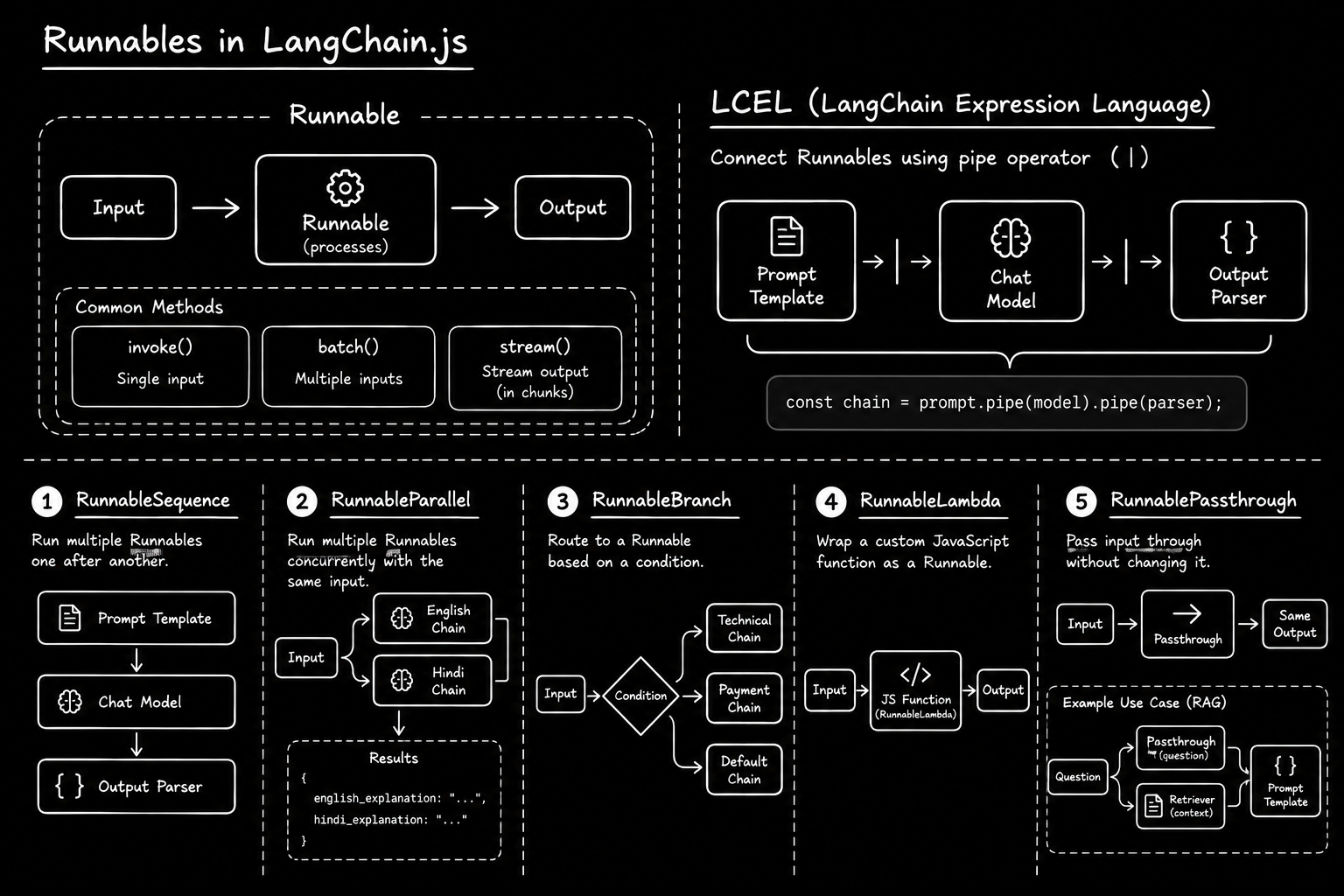
Overall Diagram
The following diagram summarizes the main Runnable utilities discussed in this section.
1. What Are Tools in AI?
In AI, a tool is a function that performs a specific task.
A task can be as simple as fetching the current weather using an API or as complex as making payments or booking tickets.
Tools are useful because LLMs cannot perform every task on their own. They can generate text and reason about problems, but they may need external tools to perform actions or access real-time information.
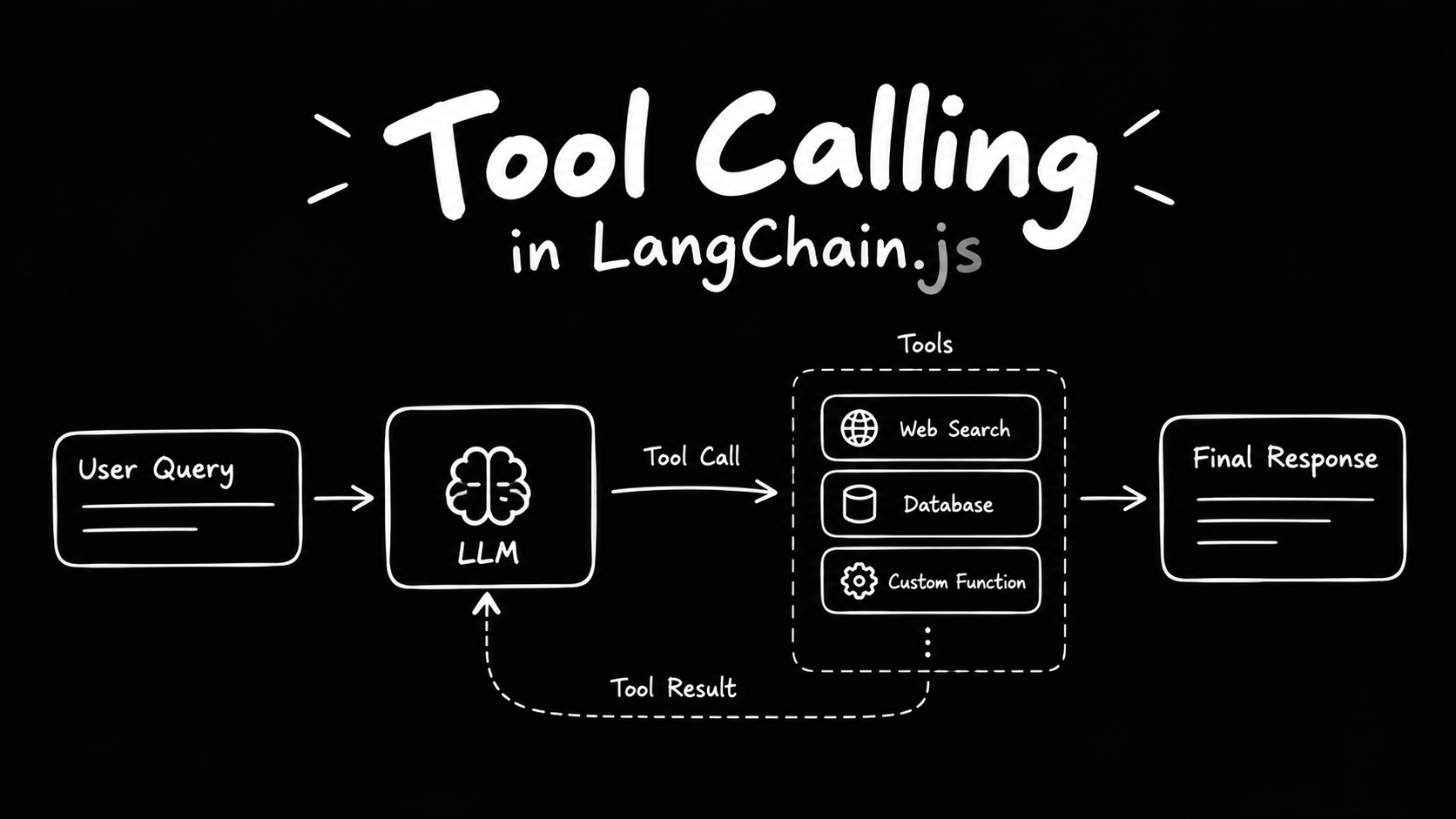
We use tools to extend the capabilities of LLMs. The model uses its reasoning capabilities to decide when to call a tool and what information to pass to it.
In LangChain.js, we can create a tool by defining a JavaScript function and providing information about what it does and what inputs it accepts. This helps the LLM understand the purpose of the tool and decide when to use it.
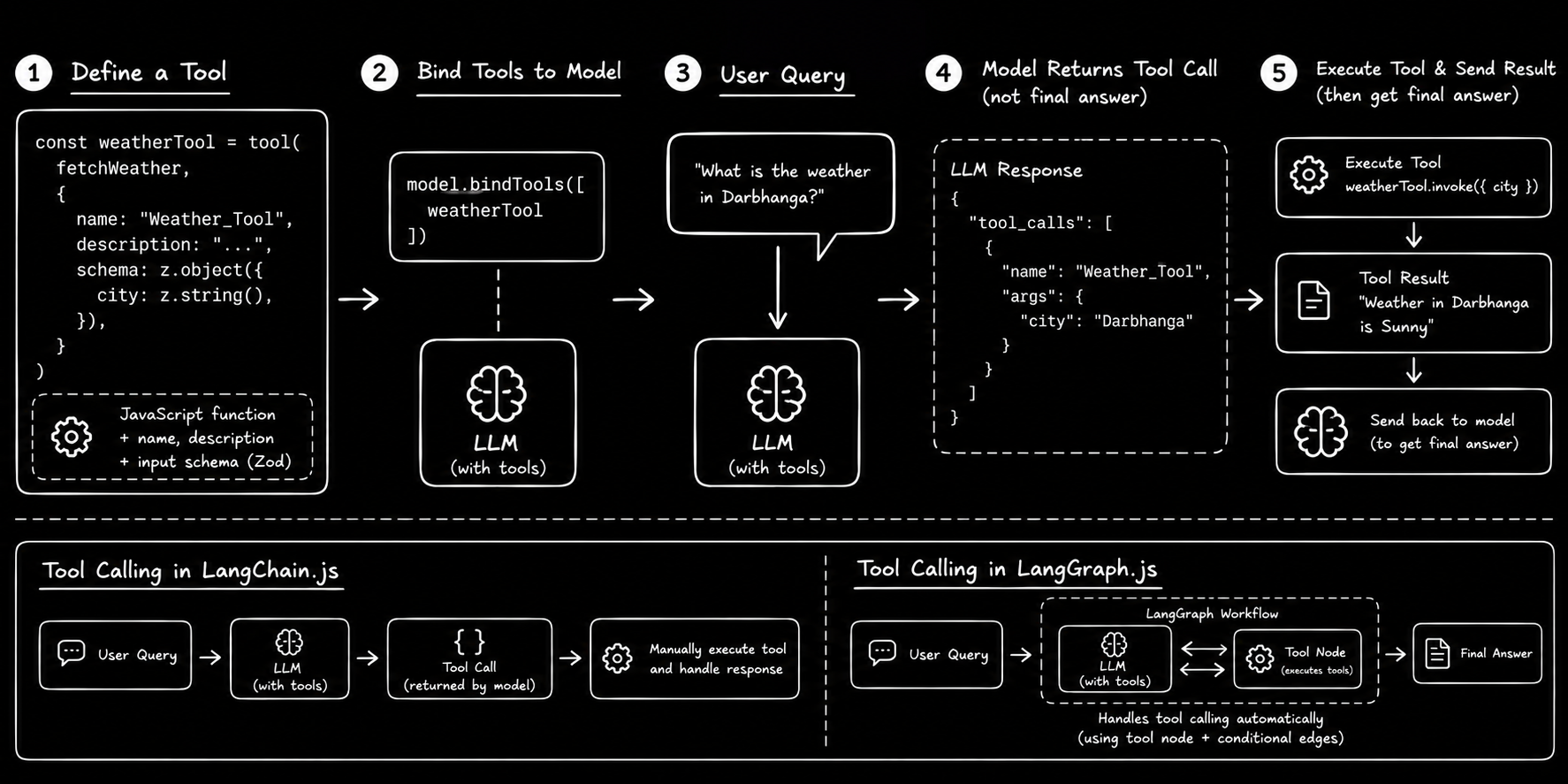
2. Creating a Tool in LangChain.js
To create a tool in LangChain.js, we need to provide a JavaScript function and an object containing the tool's name, description, and input schema.
- Function: Defines what the tool does.
- Name: Identifies the tool.
- Description: Explains what the tool does so the LLM can decide when to use it.
- Input schema: Defines the inputs the tool accepts.
Below is an example of creating a weather tool:
import { tool } from "langchain";
import * as z from "zod"; // Used to define the input schema.

const fetchWeather = async ({ city }) => {
  return `Weather in ${city} is Sunny`; // Dummy logic for now.
};

const weatherTool = tool(fetchWeather, {
  name: "Weather_Tool",
  description: "Fetches the current weather for a city.",
  schema: z.object({
    city: z.string(),
  }),
});
In this example, we create a function called fetchWeather that accepts a city name and returns a weather message.
We then use the tool() function to convert it into a tool that an LLM can call.
The input schema uses Zod to specify that the city field must be a string.
Note: The function currently returns a fixed message. In a real application, we would connect it to a weather API to fetch actual weather information.
3. Binding Tools to the Model
Defining a tool is not enough. The model must also know which tools are available to it.
We can make the tools available to the model by binding them to it using bindTools().
const modelWithTools = model.bindTools([weatherTool]);

const result = await modelWithTools.invoke(
  "What is the weather in Darbhanga?"
);
In this example, we bind the weatherTool to the model and send it a question about the weather in Darbhanga.
Now, the model knows that it can use the weather tool to answer the question.
However, binding a tool does not mean that the model executes it automatically in our JavaScript code.
Instead, the model returns a tool call in its response when it decides to use a tool. This tool call contains the tool's name and the arguments required to execute it.
We must then handle the tool call and execute the corresponding tool.
4. Executing a Tool Call in LangChain.js
After receiving the model's response, we can check whether it contains any tool calls.
If a tool call exists, we identify the requested tool, pass the required arguments, and execute it.
const toolCalls = result.tool_calls;

if (toolCalls?.length) {
  for (const toolCall of toolCalls) {
    if (toolCall.name === "Weather_Tool") {
      const toolResponse = await weatherTool.invoke(
        toolCall.args
      );

      console.log("Weather Tool Response:", toolResponse);
    }
  }
}
Let's understand what this code does:
- Get tool calls: We access
result.tool_callsto get the tool calls returned by the model. - Check for tool calls: We check whether the model has requested any tool calls.
- Identify the tool: We check whether the requested tool is
Weather_Tool. - Execute the tool: We pass the arguments provided by the model to
weatherTool.invoke(). - Get the result: The tool executes its function and returns a response, which we print to the console.
For example, the model may request the Weather_Tool with the following arguments:
{
  city: "Darbhanga"
}
The tool then returns:
Weather in Darbhanga is Sunny
This example demonstrates how to execute a tool call manually.
Important: In a complete tool-calling workflow, we usually send the tool's response back to the model. The model can then use that result to generate a final answer for the user. The example above only executes the tool and prints its response.
5. Tool Calling in LangChain.js vs. LangGraph.js
In LangChain.js, we can manually handle tool calls by writing code to identify the requested tool, execute it, and process its response.
In LangGraph.js, we can build a workflow that manages this process using components such as a tool node and conditional edges.
For example, a LangGraph workflow can:
- Send a user's question to the model.
- Check whether the model wants to call a tool.
- Execute the requested tool if necessary.
- Send the tool's response back to the model.
- Continue until the model produces a final answer.
This makes it easier to build workflows in which the model can decide when to use tools and continue working with their results.
In short, LangChain.js provides the building blocks for tool calling, while LangGraph.js allows us to organize tool calling into a workflow that can manage the process automatically.
6. Summary
- A tool is a function that performs a specific task.
- Tools extend the capabilities of LLMs by allowing them to access external information and perform actions.
- In LangChain.js, we can create tools using a JavaScript function and a configuration object containing the tool's name, description, and input schema.
- We use
bindTools()to make tools available to the model. - The model returns a tool call when it decides to use a tool.
- Our code must execute the tool and handle its response.
- In a complete workflow, the tool's response is usually sent back to the model to generate a final answer.
- LangGraph.js can help automate this process by connecting the model, tools, and workflow logic.
Summary Image